> ## Documentation Index
> Fetch the complete documentation index at: https://help.owlery.ai/llms.txt
> Use this file to discover all available pages before exploring further.
# Remittance Details
> Find remittance details for invoices paid through Owlery.
Freight Pay only applies if your shipper is paying through Owlery.
**Where to find it:** `Dashboard → Finances → Invoices`
To find remittance details, go to the **Invoices** page.
### Where paid invoices appear
Invoices that have been paid show up on one of two tabs. Due to banking & payment limitations, invoices may be in either status even once you have received payment.
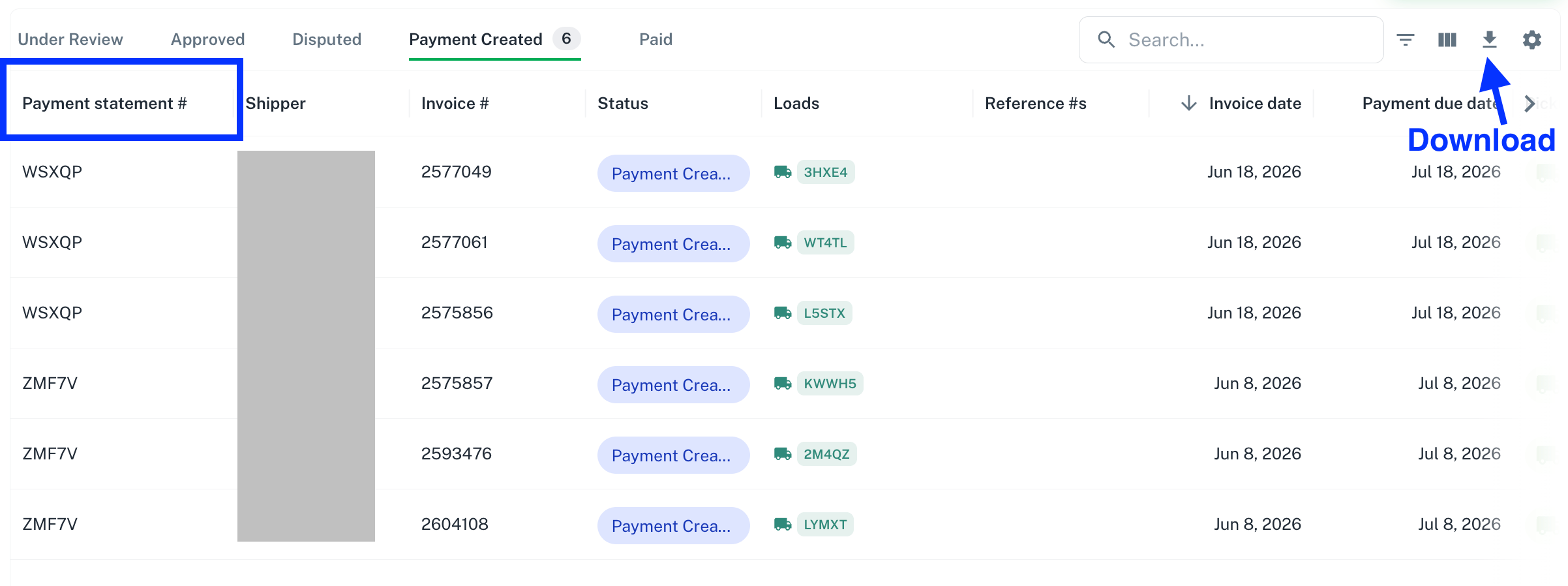
* [**Payment Created**](https://owlery.ai/dashboard/invoices?tab=paymentCreated) — payment has been initiated.
* [**Paid**](https://owlery.ai/dashboard/invoices?tab=paid) — payment has cleared.
### Matching invoices to payments
Use the **Payment Statement ID** column to see which invoices were included in which payment. Invoices sharing the same Payment Statement ID were paid together.
### Downloading detailed remittance data
For more detailed information, download the table as a CSV from the Invoices page.